O in short: Manager is a professional tool to manage print jobs. There is no need to install any drivers to control a remote printer. Remote Queue Manager allows you to visually preview documents in thequick
|
 Categories Categories |
|
|
|
|
|
Remote Queue Manager Professional 5.50 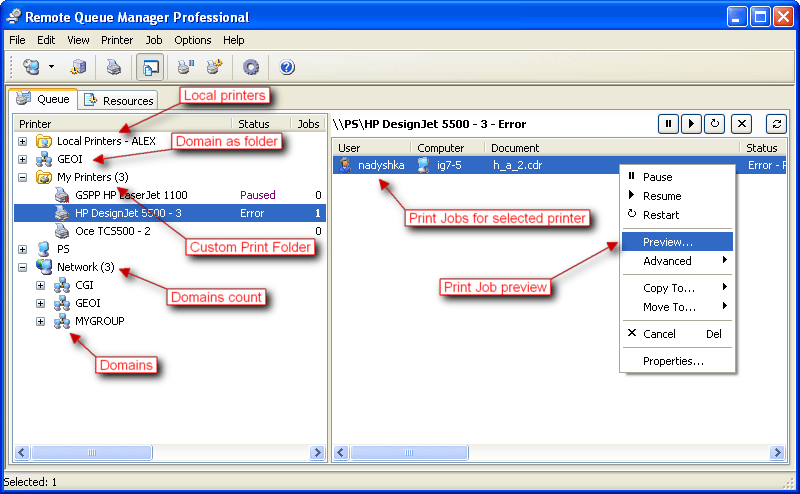
Click to enlargeDescription:Every time you use the "Print" function in one of your applications, the information goes to a spool on your hard disk before being sent to the printer. If you are printing several documents, they form a print queue. Even if you have only one printer directly connected to your computer, it's easy to get into a mess. Print jobs have a lot of complicated parameters. Simply by selecting a wrong page size/orientation, a wrong color or a page collating mode, you can end up with tons of wasted paper, ink, time and nerves. Worst of all is that the documents themselves have a tendency to contain typos. Required corrections always come to your attention only after sending a document to the printer. In offices where several people share the same printer across a network, this problem appears often and a good reliable tool to manage the printer queue is a must. Unfortunately, standard methods of printer queue management offered in Windows are rather limited.. You have to distinguish jobs by their not very descriptive names and usually "Cancel" is the only action available. In addition, to control a remote printer's queue, you need to install its drivers on your local PC.Remote Queue Manager is a professional tool to manage print jobs. There is no need to install any drivers to control a remote printer. The program uses the remote computer's drivers. Instead of searching through non-descriptive job names, Remote Queue Manager allows you to visually preview documents in the spool. You can easily connect to a remote printer cancelling unwanted jobs or changing the priority for others. The program also allows you to view properties for every printer job (paper size and orientation, printing preferences etc).Do you have more than one printer in your network? If so, that's NOT a problem. Remote Queue Manager helps you control all the printers in your organization, right from where you sit.
 | Price $ 49 /

Purchase Remote Queue Manager Professional
Get it Now(to see additional options, click Buy Now) Type: Shareware File size: 2711 Kb Date: 03/04/2013 HomepageInstall support: Install and Uninstall OS: WinXP, WinVista, WinVista x64, Win7 x32, Win7 x64, Win2000, Windows2000, Windows2003, WinServer, Windows Vista Ultimate, Windows Vista Ultimate x64, Windows Media Center Edition 2005, Windows Vista Starter, Windows Vista Home Basic, Windows Vista Home Premium, Windows Vista Business, Windows Vista Enterprise, Windows Vista Home Basic x64, Windows Vista Home Premium x64, Windows Vista Business x64, Windows Vista Enterprise x64 System requirements: A standard Windows XP/2003/Vista/2008/7 Language: English, Arabic, Armenian, Czech, French, German, Greek, Hungarian, Italian, Japanese, Polish, Portuguese, Russian, Slovak, Spanish Recent changes in this Major Update:Added new option "Print as Sorted". Now you can change print order for whole list of print jobs for selected printer. This option is available from context menu of print jobs.Added new version checking.Added Czech translation.Improved support for many Epson printers. | See also in:
| Utilities and Hardware: Utilities and Hardware:Printers | |  | Print from DOS, Unix, Linux to Windows printers: USB, GDI, PDF, e-mail, network, IP, fax, virtual. Capture LPT1: .. LPT9: port and redirect the jobs, even to a printer physically connected to the captured port and w/out physical LPT ports installed |
|
|
|





